
Computers have historically excelled at displaying video but struggled to understand it.
If you show a human a video of a football match they see players, a ball, a goal and much more. If you show a computer the same video it just sees a grid of coloured dots. To fix this traditionally would you spend months building custom models. You had to collect thousands of photos, draw boxes around the points of interest by hand and “train” the computer to recognise the shape.
Meta’s Segment Anything Model 3 (SAM 3) changed this completely. It gave computers the ability to understand objects just by being told what to look for.
We are excited to announce we have integrated SAM 3 directly into Fifth Layer. This means you can now track objects in your video just by typing a word. You do not need to train a model or write complex code. You just use a simple text prompt.
The Big Change: Promptable Vision
SAM 3 is different because you do not need to teach it first unlike alternatives like Darknet’s Yolo. It is ready to go out of the box.
You simply give it a text prompt like “basketball player” or “referee” and it returns the location of those objects.
For example look at the frame from a video below we generated with Fifth Layer. In this complex shot of a basketball game the model was simply prompted to look for “player”. It returned two distinct layers of data which you can see highlighted:
- Bounding Box (Green): A simple box drawn around the object. This is lightweight data perfect for tracking location.
- Segmentation Mask (Red): A precise cutout of the object that follows its exact shape.
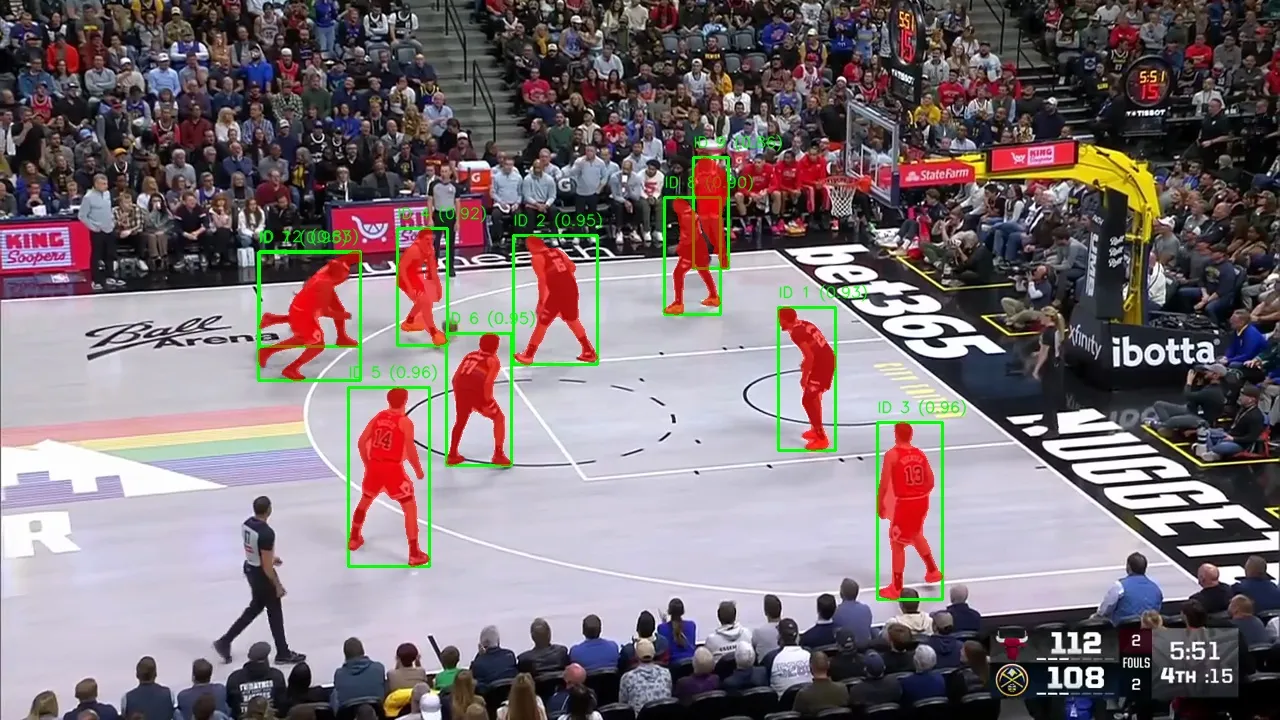 Above: A visual example of SAM 3 outputting both bounding boxes and segmentation masks based on a simple text prompt.
This flexibility allows you to do very powerful things. You can use the mask to cut a player out of the background for a visual effect or highlights. You can use the box to simply log where they are on the screen.
The Fifth Layer Integration
In Fifth Layer we treat SAM 3 as a standard operator. You drag it onto the canvas and connect it to your video source. We handle all the difficult technical work like decoding the video stream and extracting the frames.
Whether your video is a file (like an MP4) or a live broadcast stream (like HLS, SRT or Dash) Fifth Layer normalises it. This means the system treats all video the same way so you can use the exact same logic for live sports as you do for archived footage.
The Workflow Architecture
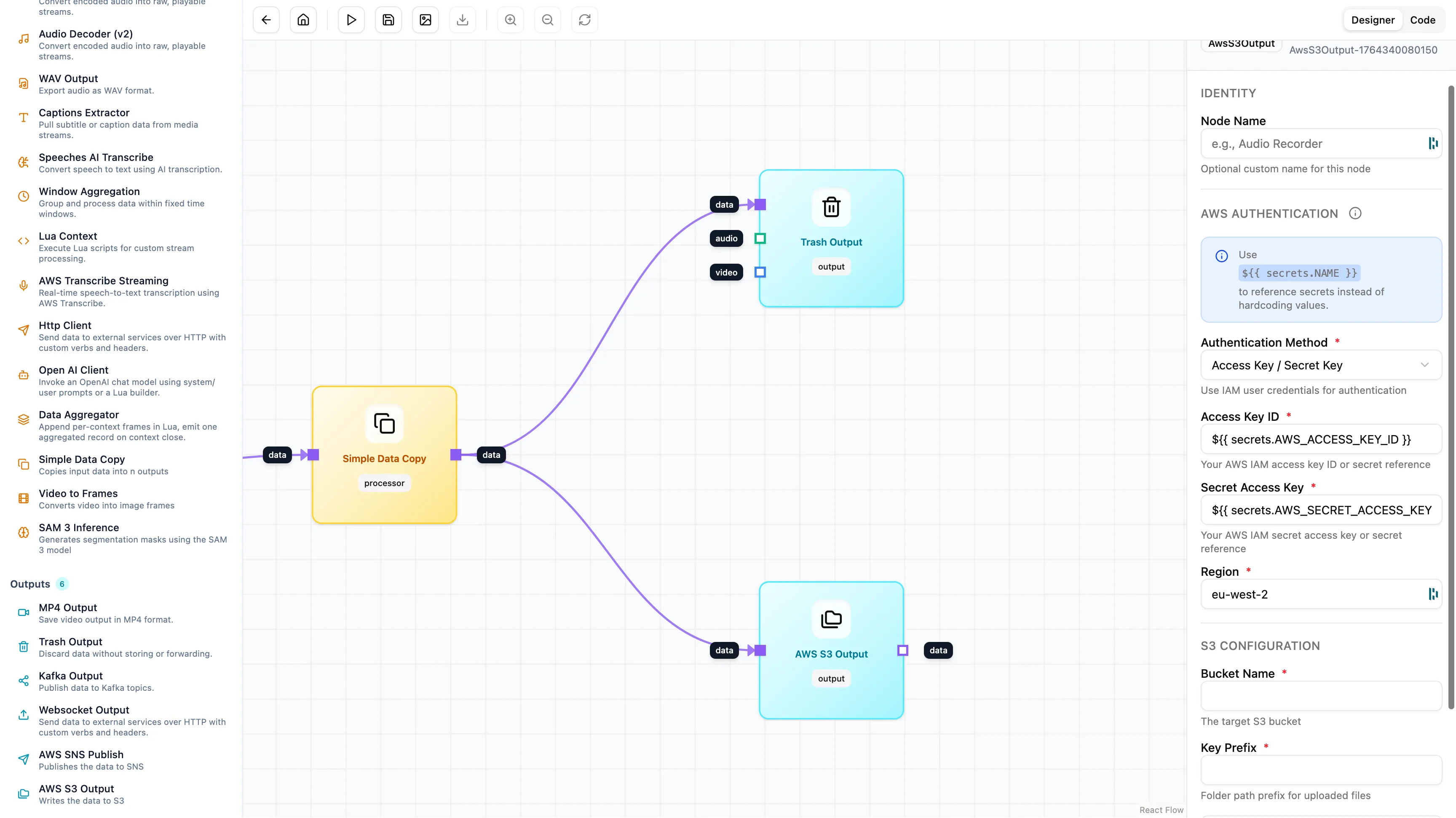
We built a production workflow that takes a video, finds the players using SAM 3, cleans up the data and saves it to storage for later use.
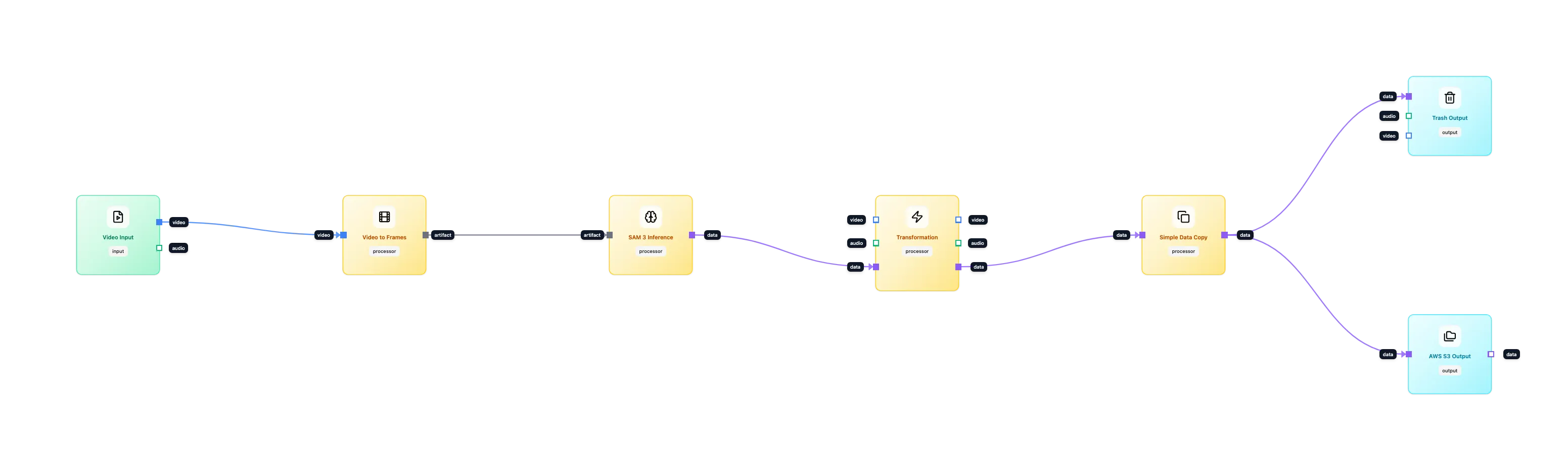
1. Ingestion and Normalisation
We start with the Video Input node on the far left. Fifth Layer takes the video and breaks it down frame by frame.
Crucially we preserve the time. Every frame of video has a specific timestamp (PTS) that tells us exactly when it appeared. If a goal happens at 00:14:22 we keep that number attached to the frame as it moves through the system. This allows us to link our data back to that exact moment later on.
2. Finding the Objects
We use the SAM 3 Inference node. We don’t need to write code. We just set the prompt to “player”. The node looks at the video frame and finds every entity matching your description. It attaches the data (the box and the mask) to the frame and passes it to the next step.
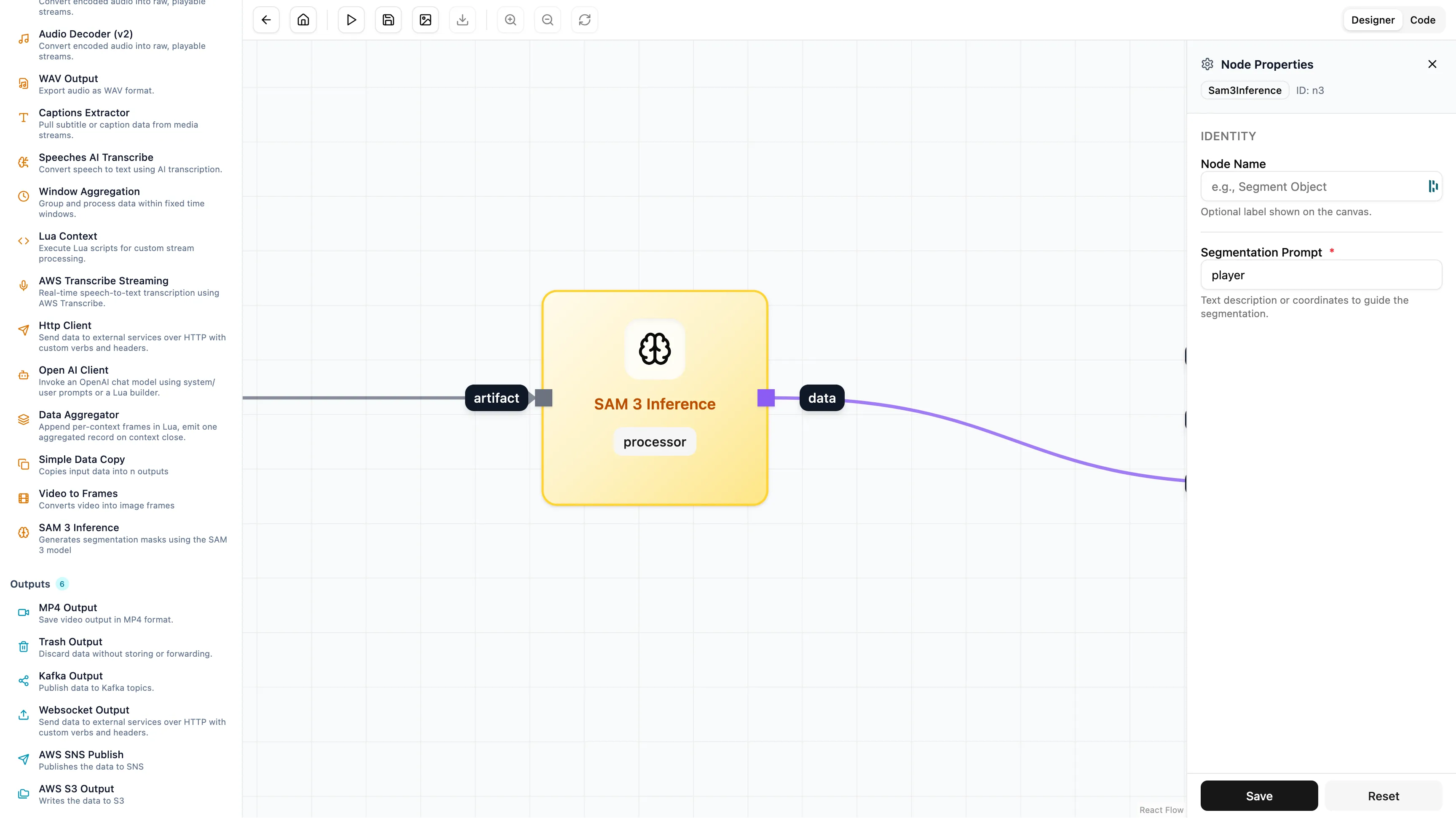
3. Cleaning the Data
SAM 3 provides a lot of detail. It gives us a pixel-perfect shape of the player which is heavy to store. For this workflow we only want to know where the player is so we can search for them later. We don’t need the full shape.
We use a Transformation node to remove the heavy data.
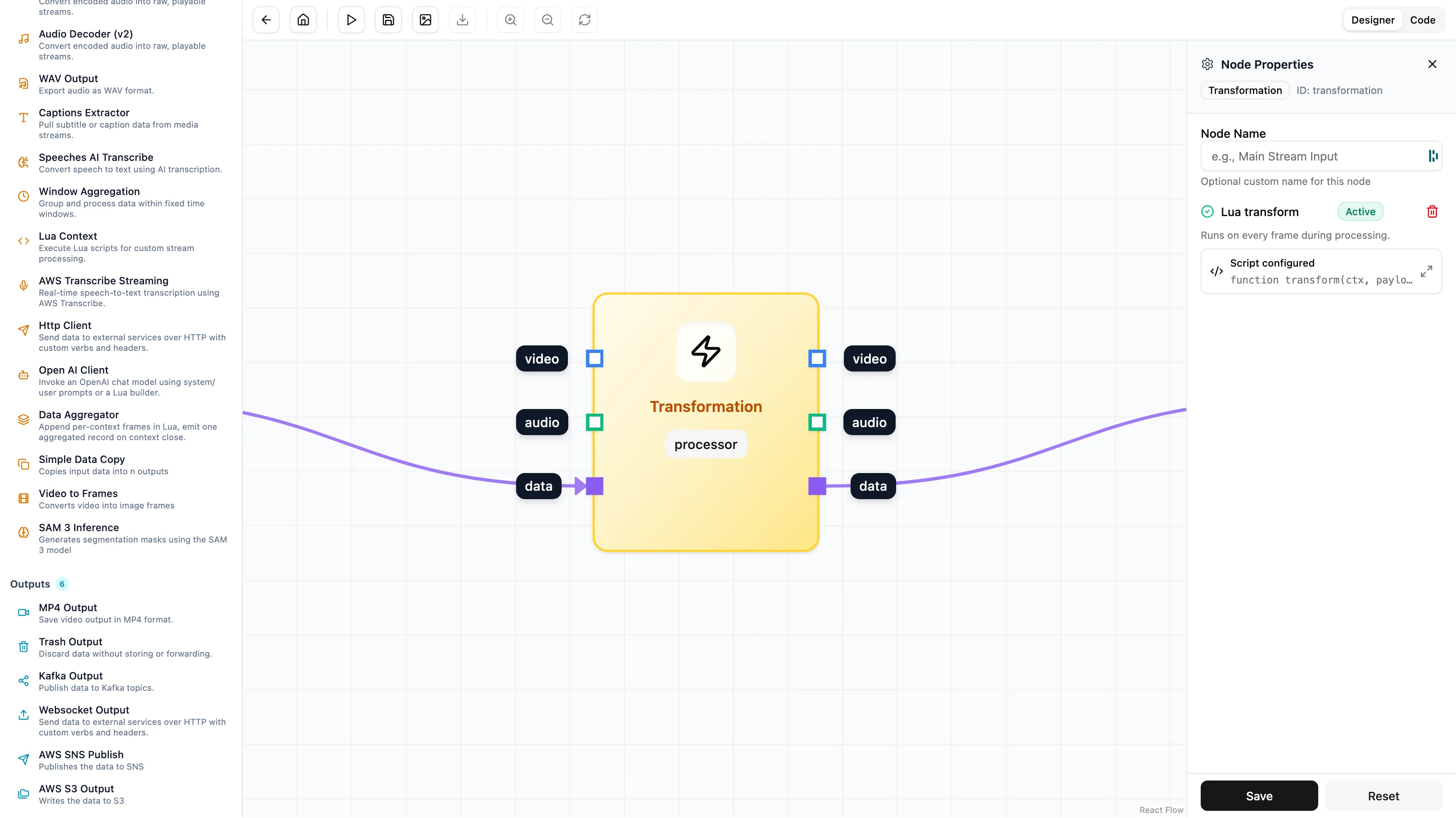
Using a small script inside the node we strip out the “mask” and keep only the “bounding box”.
function transform(ctx, payload)
    local data = payload.payload or {}
    local objects = data.objects or {}

    -- Optimise payload for transport
    for i = 1, #objects do
        -- Remove the binary mask to save space
        objects[i].mask = nil
    end

    return data
end
4. Storage and Recall
Finally we send the data to an AWS S3 Output node on the far right.
The output matches the source video frame-for-frame but instead of pixels we get structured data:
{
  "objects": [
    {
      "objectId": 0,
      "score": 0.9609375,
      "bbox": {
        "yMin": 256.0,
        "xMax": 1052.0,
        "yMax": 417.0,
        "xMin": 935.0
      }
    },
    {
      "objectId": 1,
      "score": 0.819212,
      "bbox": {
        "yMax": 208.0,
        "xMax": 610.0,
        "yMin": 112.0,
        "xMin": 570.0
      }
    }
  ],
  "prompts": {
    "player": [
      0,
      1,
      2
    ]
  },
  "pts_seconds": 0.066,
  "pts": 1980,
  "time_base": {
    "den": 30000,
    "num": 1
  },
  "frame": {
    "height": 720,
    "width": 1280
  }
}
Turning Pixels into Data
Once this data lands in S3 you can use it to enrich your media assets instantly. By preserving the exact timestamps and coordinates you enable editing software and Content Management Systems to index specific points of interest automatically.
This transforms your video archive or live stream into a searchable database. You can process your entire back catalogue to get a frame accurate index.
We have unlocked the ability to explore data in new ways without writing code or training models. You can build this workflow in minutes instead of months and take it from a proof of concept to production immediately.
Summary
By integrating SAM 3 we have made advanced computer vision simple.
- No Training: You just type what you are looking for.
- Works Everywhere: You can use it on live streams or saved files.
- Searchable: We save the data so you can find clips instantly in your CMS or editing suite.
We focus on the infrastructure so you can focus on building smart features for your viewers.