
Modern streaming feels simple. You tap play and the video arrives. You jump back, skip forward or switch from your TV to your phone. It just works.
A modern marvel and amazing how over the top delivery relies on the same HTTP technologies that power the rest of the web. HLS and DASH take continuous video, slice it into tiny segments and serve them as small files. Your device downloads these chunks, stitches them back together and plays them.
It sounds straightforward but when you look inside the playlists, the complexity becomes obvious. This is especially true when you are trying to process live media faster than it is being produced.
Why Streaming Gets Complicated
HLS shifts the complexity of streaming from the server to the client. It is not just a stream of bytes; it is a dynamic instruction set that requires the receiver to make constant decisions.
The structure is hierarchical. You start at the top with the Master Playlist. This file defines the menu of different quality levels and resolutions.
A typical HLS Master Playlist:
#EXTM3U
#EXT-X-VERSION:3

# Alternative audio renditions (Languages)
#EXT-X-MEDIA:TYPE=AUDIO,GROUP-ID="audios",LANGUAGE="en",NAME="English",DEFAULT=YES,URI="eng.m3u8"
#EXT-X-MEDIA:TYPE=AUDIO,GROUP-ID="audios",LANGUAGE="es",NAME="Spanish",DEFAULT=NO,URI="spa.m3u8"

# Video variants referencing the audio group
#EXT-X-STREAM-INF:BANDWIDTH=800000,RESOLUTION=640x360,AUDIO="audios"
index-1.m3u8
#EXT-X-STREAM-INF:BANDWIDTH=1600000,RESOLUTION=1280x720,AUDIO="audios"
index-2.m3u8
#EXT-X-STREAM-INF:BANDWIDTH=3500000,RESOLUTION=1920x1080,AUDIO="audios"
index-3.m3u8
Once a variant is selected you enter the Live Media Playlist.
This is the active timeline and in a live environment this file is volatile. It updates every few seconds as new segments are generated. It often carries critical metadata regarding absolute time, ad-insertion points and discontinuity flags.
A Live Media Playlist with metadata:
#EXTM3U
#EXT-X-TARGETDURATION:4
#EXT-X-MEDIA-SEQUENCE:1200

#EXTINF:4.0,
segment1999.ts
#EXTINF:4.0,
segment1998.ts
#EXT-X-PROGRAM-DATE-TIME:2025-01-15T10:22:33.000Z
#EXT-X-SCTE35:CUE="FC/DA=="
#EXT-X-CUE-OUT:DURATION=12
#EXTINF:4.0,
segment1200.ts
#EXTINF:4.0,
segment1201.ts
#EXTINF:4.0,
segment1202.ts
#EXT-X-CUE-IN
#EXTINF:4.0,
segment1203.ts
Building a robust processing engine requires you to handle all of these variables simultaneously and without error:
- Bitrate Switching: You must seamlessly switch between qualities (the ladder) as network conditions change without stalling the pipeline.
- Alternative Renditions: You must keep separate audio and video tracks perfectly synchronised, even if they are served from different files.
- Discontinuities: Timestamps often reset or jump. If your math relies on a continuous timeline, these jumps will break your logic.
- Frame-Accurate Metadata: Signals like
SCTE35(ad markers) must be extracted with frame perfect precision, not just estimated.
The “Black Box” Problem
Most off-the-shelf media processors act like black boxes. You pour video in and you get a transcoded file out.
You may ask yourself what happened to all the other data?
If a SCTE marker carried a specific ID which can hint at which AI model you should use, most processors strip that information away immediately. They decode the video but discard the context.
We realised that to build advanced workflows we couldn’t use a system that throws away data. We needed a system where nothing is lost.
So we built Fifth Layer from the ground up. Including it’s media handling stack.
In Fifth Layer - Everything is a Frame
To explain how Fifth Layer works, imagine a mailroom.
In most media systems you receive a package, tear it open, take the object out and throw the box away. If the sender wrote “Fragile” or “Deliver to Boardroom” on the box, that information is lost the moment you open it.
Fifth Layer works differently. We model everything as a Frame.
Think of a Frame as a smart travel case.
- The Payload: Inside the case is the valuable content (the Audio or Video).
- The Tags: On the outside of the case are post it notes.
Crucially, this is not a black box as we hand you the pen. You can read the existing tags, cross them out or write new ones.
      +-----------------------------+
      |         SMART CASE          |
      |                             |
      |  [ Tag: Timestamp: 10:00 ]  |
      |  [ Tag: SCTE ID: 12345   ]  |
      |  [ Tag: AI Label: Sport  ]  | <--- You added this
      |                             |
      |      +---------------+      |
      |      |    PAYLOAD    |      |
      |      | (Raw Video)   |      |
      |      +---------------+      |
      +-----------------------------+
When a stream enters Fifth Layer we don’t just decode the video. We package the video into these Frames. If we see a custom tag in the HLS playlist we stick it onto the outside of the Frame.
As the Frame moves down the pipeline the video might get resized or the audio might get transcribed but the tags stay attached. We call this data lineage. You can inspect them at any point to make routing decisions or modify them to enrich the data for the next step.
How Frames Flow
We process media by connecting Operators. A Frame enters an operator, something happens to it and it exits the other side.
[ Source ] ---> [ Operator ] ---> [ Operator ] ---> [ Output ]
    |               |                 |                 |
  Frame           Frame             Frame             Frame
 (Video)      (Video + Text)    (Video + Text     (JSON Record)
                                 + Sentiment)
Because the metadata travels with the payload you can build complex logic easily:
- Decoder: Turns HLS segments into raw audio frames.
- AWS Transcribe: Listens to the audio payload, generates text and writes a new
Texttag onto the outside of the Frame. - Filter: Reads the
Texttag. If it contains a specific keyword it passes the Frame downstream.
The Limitation of Linear Flow
This pipeline approach works brilliantly for immediate actions like resizing a video frame or inspecting a tag. It has a blind spot, it treats every frame as an island.
In the real world meaning rarely happens at the fraction of a second mark. A single audio frame might contain the sound of a syllable but you need hundreds of frames to capture a whole sentence. An ad break isn’t one image but a sequence of tens of thousands.
To make sense of the content you need more than just flow, you require the entire context. You need to be able to say “start collecting now” and “stop collecting now”.
Context: The Power of “Bookends”
Fifth Layer solves this with Control Frames. Think of these as “Bookends” that organise your data stream.
We provide standard operators to group data but the real power lies in your ability to define the logic. You can decide when a context opens and when it closes.
Imagine you want to summarise a live broadcast but you want to exclude the commercials.
- Logic: You configure the system to trigger a “Context Open” frame when the programme starts and a “Context Close” frame when an SCTE ad-marker appears.
- Aggregation: Between these two bookends we collect every line of transcribed text.
       Programme Start          Ad Break Start
           |                         |
[ ( Open ) ] [ Frame ] [ Frame ] [ Frame ] [ ( Close ) ]
      ^                                          ^
      |                                          |
 "Start collecting text"                    "Bundle and Summarise"
Real-World Example: Live Summarisation
This “Bookend” architecture allows us to build workflows that were previously incredibly difficult.
Below is a complete workflow built in Fifth Layer. It ingests a live HLS stream, transcribes the audio, aggregates the text based on context and sends it to OpenAI for summarisation.
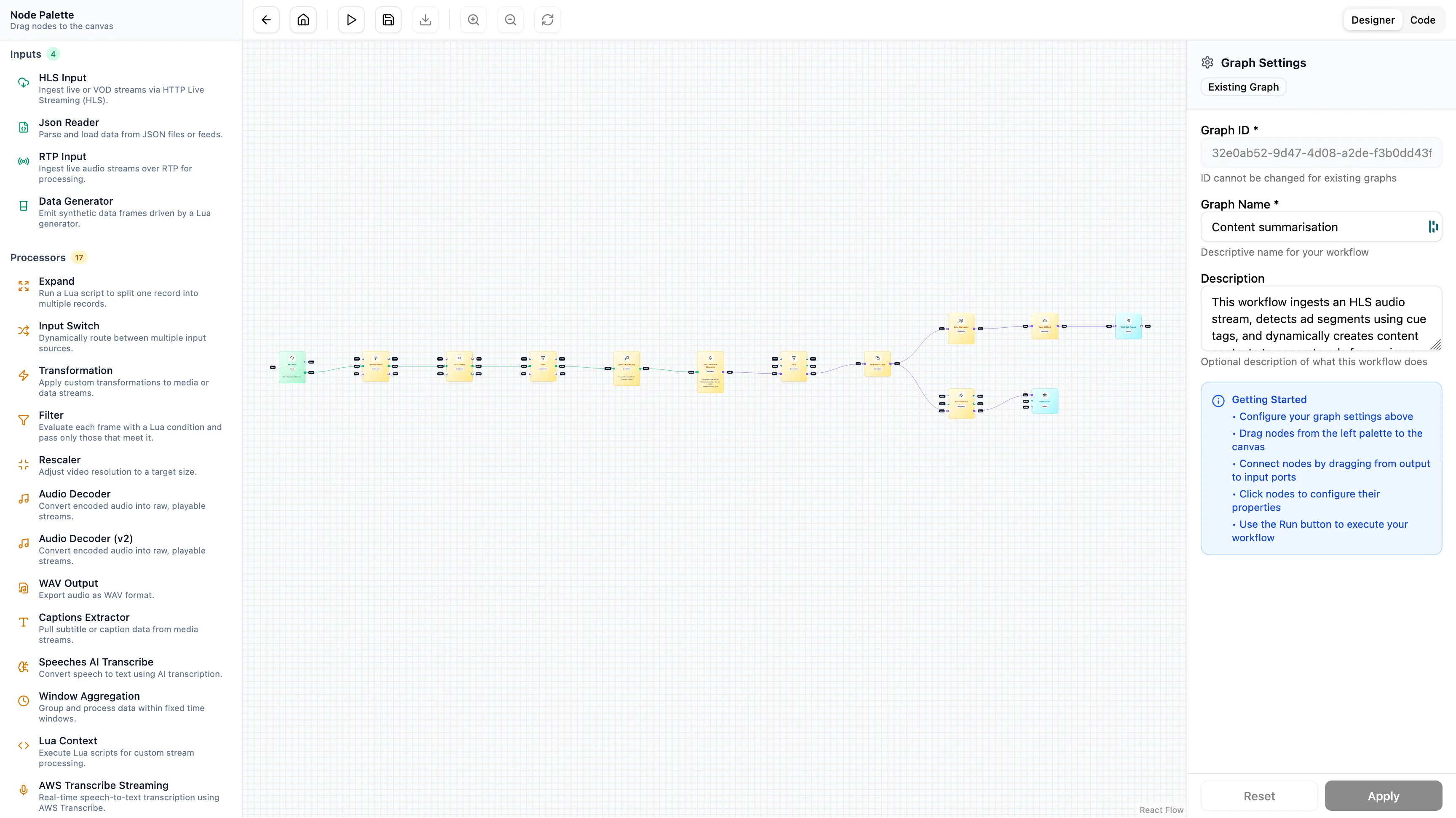
The flow allows you to combine standard media operations with advanced AI logic:
[ HLS Input ]
      ↓
[ Create Context @ Content Boundary ]
      ↓
[ Audio Decoder ]
      ↓
[ AWS Transcribe Streaming ]
      ↓
[ Data Aggregator (Wait for Context Close) ]
      ↓
[ OpenAI Client (Summarise) ]
      ↓
[ Output ]- HLS Input: Reads the manifest and preserves tags.
- Create Context: Reads the HLS tags and creates context marking for content boundaries between adverts.
- Audio Decoder: Extracts the audio payload.
- AWS Transcribe: Adds raw text tags to frames.
- Data Aggregator: Holds the text tags until the “Context Close” bookend arrives.
- OpenAI Client: Sends the complete bundle of text to GPT-4.1 mini to generate a summary.
This architecture allows you to perform real-time content analysis that is frame perfect and aware of the broadcast structure. You aren’t just processing pixels, you’re modelling the logical structure of the event.
What This Unlocks
This isn’t just about reading tags. It is about speed, scale and capability that Fifth Layer unlocks for demanding needs.
We wrote one of the fastest media processing engines available today. It is built from the ground up to handle the demanding workloads of live sports, news and 24/7 entertainment. It processes streams with incredibly low latency which means your data is ready while the event is still happening.
By pairing Fifth Layers realtime performance it’s flexibility, teams can apply AI to their media without the heavy upfront cost of building the underlying infrastructure.
- Integrate LLMs in Minutes: You don’t need to build a complex ingestion pipeline to get data to unlock OpenAI’s GPT or Gemini. You just drag a node onto the canvas.
- Extract Deep Context: Because you can aggregate data over time you can ask an AI to “summarise the last quarter” or “analyse the sentiment of this interview” rather than just transcribing disjointed words.
- Focus on Value: You stop maintaining fragile glue code and start building features.
We built the stack so you can build the product. We focus on the plumbing. You focus on the initiative.